
A mobile-friendly website is no longer optional for accounting firms, it’s essential. With over half of all web traffic coming from mobile devices, your accounting website must load fast, look professional, and be easy to navigate on any screen.
Modern accountant websites aren’t just digital brochures, they’re growth tools. A well-structured, mobile-optimized site supports lead generation, strengthens client acquisition, and builds trust through clear messaging, fast performance, and strong search engine visibility.
Pairing smart mobile web design with targeted SEO strategies, like local SEO, keyword research, and optimized meta descriptions, can dramatically improve how your site appears in search engine results pages.
What you’ll learn in this guide
By the end of this guide, you’ll know how to:
- Design a mobile-friendly accounting website that builds trust and drives client acquisition
- Use responsive design and layout principles to improve usability across all mobile devices
- Optimize your site with technical SEO, including schema markup, meta descriptions, and internal links
- Structure your content to match search intent and attract leads via Google Search and AI Overviews
- Choose the right tools and templates to launch or upgrade your mobile site
- Track mobile performance and refine your UX strategy using real user data
Why Mobile-Friendly Design Matters for Accounting Firms
More than 60% of all website traffic now comes from mobile devices, yet many accounting firm websites are still built with a desktop-first mindset. That’s a costly oversight.
When a potential client visits your site on their phone and runs into slow load times, clunky menus, or unreadable text, they’re likely to leave, and choose another firm. In contrast, mobile-friendly sites with clean navigation, responsive layouts, and fast performance create a positive first impression and increase lead generation opportunities.
This is especially important for accounting services that target small businesses or time-strapped professionals who browse on the go. A mobile-optimized accounting website shows your firm is modern, accessible, and professional.
Search engines like Google now use mobile-first indexing, meaning your mobile experience directly affects your search engine rankings. If your site isn’t responsive, you’re not just losing leads, you’re losing visibility.
Core Principles of Mobile Web Design for Accountants
Modern accountant websites need to do more than just look good, they must serve as conversion-focused, mobile-ready tools that attract potential clients, support search engine optimization, and reflect your firm’s professionalism.
In the mobile age, your accounting website is often your firm’s first point of contact with a lead. For a small business owner scrolling between meetings or a self-employed professional checking your accounting services on their phone, your mobile experience either builds trust, or drives them away.
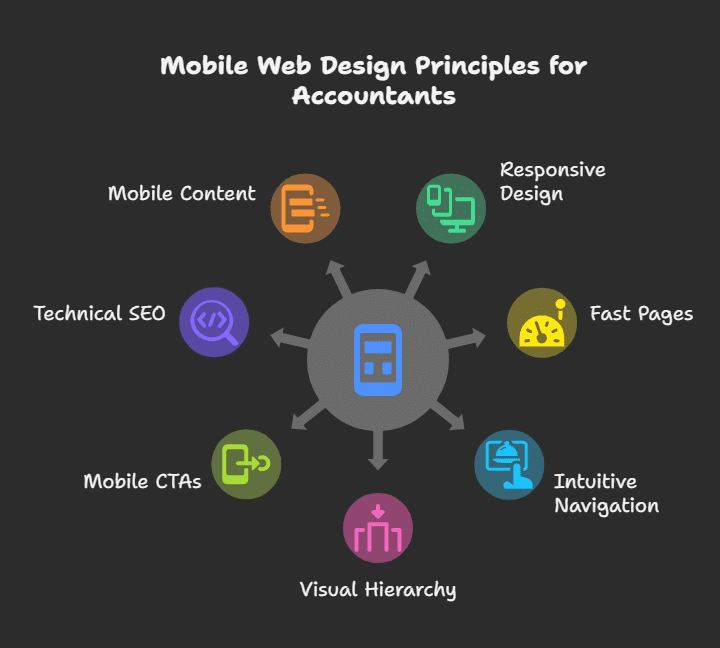
Here are the core mobile web design principles every accounting firm website should follow:
Responsive Design That Adapts to All Devices
Responsive design ensures your web pages resize and reformat based on the user’s screen, whether it’s a phone, tablet, or desktop. It’s the foundation of mobile-friendly accountant websites.
If your site isn’t responsive, visitors on mobile devices will encounter zoom issues, broken layouts, or confusing navigation, all of which increase bounce rates and hurt search engine rankings.
Good responsive design is now a ranking factor in Google Search and a must-have for showing up in mobile search engine results pages.
Many popular platforms, including CPA Site Solutions, offer pre-built responsive templates for accounting professionals. But even if you go the custom route, ensure your developer understands modern accountant web design standards.
Fast, Lightweight Pages for Mobile Users
Page speed isn’t just about user experience, it directly impacts your visibility in search engines and overall search engine optimization performance.
Mobile users are impatient. If your accounting website takes more than three seconds to load, studies show a sharp drop in engagement. This can lead to missed opportunities, especially for time-sensitive services like tax preparation.
Improve load speed by:
- Compressing high quality images
- Reducing unnecessary scripts and third-party tools
- Using clean, lightweight themes
- Hosting with performance-focused providers
Fast mobile sites see more organic traffic, higher time-on-site, and better conversion metrics, making them essential to any SEO strategy.
Thumb-Friendly, Intuitive Navigation
Your mobile navigation should be designed for fingers, not mice. Use hamburger menus, clear spacing, and large tap targets to help users move through your accounting firm website design without frustration.
Important features like your client portal, “Contact Us” button, and landing pages for specialized services (like financial planning or business advisory) should be accessible within one or two taps.
A mobile user who can’t easily find what they need won’t stick around. Every second counts in making a strong impression on potential clients.
Visual Hierarchy That Guides and Converts
Your mobile site should immediately tell users:
- Who you are
- What accounting services you provide
- Why they should trust you
Use bold headers, strong contrast, and generous white space. Avoid overwhelming users with too much copy on one screen. Instead, use short paragraphs, simple words, and a flow that supports scanning.
Highlight client testimonials, certifications, and client success stories prominently. These elements build credibility quickly, especially for new prospective clients comparing firms.
Don’t forget your target audience. If you serve small businesses, emphasize convenience, responsiveness, and expertise in local compliance. If you offer specialized services, make those obvious in your mobile layout.
Mobile-Focused CTA Strategy
Every scroll should lead users closer to taking action. On mobile, that action must be clear, quick, and easy to complete.
Place sticky CTAs (like “Schedule a Free Consultation” or “Call a CPA Now”) near the top and bottom of key pages. Make your forms mobile-friendly by:
- Using large input fields
- Keeping questions minimal
- Avoiding unnecessary steps
Data shows that mobile-optimized CTAs can increase lead generation by up to 45% on accountant websites.
Technical SEO Must-Haves for Mobile Performance
A mobile-friendly site isn’t just good for users, it’s good for search engines. Modern technical SEO practices demand clean code, structured data, and mobile-first indexing compatibility.
Key steps:
- Optimize metadata, including meta descriptions and title tags with relevant keywords
- Use schema markup for services, reviews, and business info
- Ensure your site appears correctly in Google’s Mobile-Friendly Test and Core Web Vitals
- Monitor mobile errors in Google Search Console
- Add internal links to help users and bots move easily between related web pages
Content Built for Mobile Engagement
Your accounting website design should prioritize high quality content that’s written for mobile users, not just desktop readers.
Best practices:
- Break long blog posts into sections with headings
- Add collapsible FAQs to address search intent
- Highlight key takeaways for skim-readers
- Use bullet points for services like tax preparation, audits, or accounting software integration
Mobile content that answers common questions and clearly showcases your specialized services helps your site stand out in AI-powered results, especially for local accounting firm searches.
Prioritizing Mobile User Experience (UX)
Your accounting website may have the right structure, but without a seamless mobile user experience, potential clients will still bounce. UX is about how visitors feel while interacting with your site, and on mobile devices, attention spans are short and expectations are high.
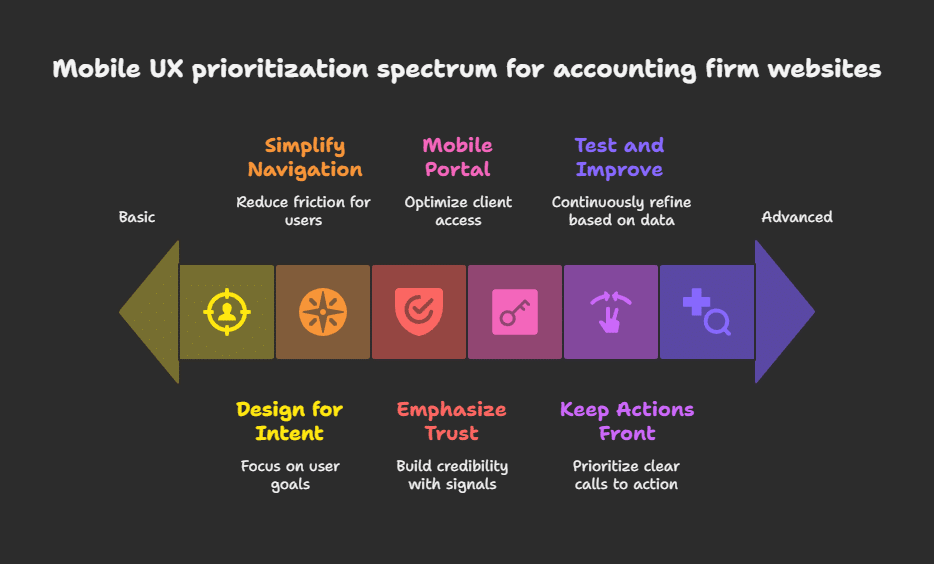
Modern accountant websites should be designed around what prospective clients actually do on mobile: skim content, tap quickly, and act fast. Here’s how to prioritize mobile UX for accounting firm websites:
Design for User Intent, Not Just Appearance
Users visiting your site from a smartphone usually have clear goals:
- Learn about your accounting services
- Schedule a consultation
- Access the client portal
- Check if you offer tax preparation or financial planning
Every mobile page should support these actions with minimal effort. Use bold, descriptive headings that reflect real search intent and match the phrases small business owners might use, like “Business Tax Help,” “IRS Filing Assistance,” or “Secure Document Upload.”
Simplify Navigation and Reduce Friction
On mobile, simple = effective. Avoid cluttered menus or dropdowns with too many links. Instead:
- Stick to 5–7 top-level items
- Use a hamburger menu with clear labels (e.g., “Services,” “About,” “FAQs,” “Client Portal”)
- Include a prominent contact button on every screen
This helps accounting professionals guide visitors toward high-converting areas like landing pages, success stories, or your “Book a Consultation” form.
Make Your Client Portal Mobile-Accessible
Many modern accounting firm websites offer secure client portal access, but fail to optimize it for phones. A frustrating portal experience can hurt your firm’s credibility.
A mobile-optimized portal should:
- Allow easy login with minimal steps
- Load quickly with no broken elements
- Offer secure document upload for accounting software or tax files
- Provide status updates or messages between your team and the client
Firms that prioritize this experience have seen a 30% boost in retention, especially during tax season.
Emphasize Trust-Building Elements
On a small screen, every detail matters. Including the right trust signals early in the user journey can dramatically improve conversions.
Use mobile-friendly formats to display:
- Client testimonials (short quotes with headshots or company names)
- Logos of businesses you’ve worked with
- Compliance badges or CPA affiliations
- Links to client success stories or industry case studies
These reassure visitors that you’re not just another generic firm, you’re a professional, trusted solution for their accounting needs.
Keep Actions Front and Center
Avoid burying CTAs at the bottom of long pages. Instead:
- Use sticky “Call Now” or “Get a Free Quote” buttons
- Add tap-to-call links for immediate mobile contact
- Use contrasting colors to draw attention to CTAs
When paired with thoughtful accounting website design, these UX tweaks can significantly increase your mobile lead generation rates.
Test, Measure, Improve
Use tools like Hotjar or Microsoft Clarity to view mobile behavior recordings. Analyze where users drop off, rage-click, or pause. Then refine your UX to match user patterns.
Also track:
- Mobile bounce rate
- Time on site (especially on service pages)
- Contact form submissions by device
- Click-through rates from mobile search results
Mobile UX isn’t “set and forget.” Top-performing accounting firm websites continuously evolve to meet changing behavior and search engine demands.
Content That Works on Mobile
Most visitors don’t read, they scan. That’s especially true on phones, where small screens and limited attention spans make traditional content formats hard to digest. For accountant websites, this means your content must deliver value fast, clearly, and with mobile behavior in mind.
Structure Content for Scanning
Mobile users skim headlines, tap CTAs, and avoid long paragraphs. The best accounting websites format their content with:
- Short paragraphs (2–3 lines max)
- Descriptive subheadings (e.g., “Tax Services for Small Businesses”)
- Bullet points for service offerings or checklists
- Bold text to highlight key takeaways
- Mobile-friendly spacing and font sizes
This formatting not only improves UX, it also helps you rank for search intent queries on search engines.
Align Content with User Intent
Each web page should answer a specific question or need. A visitor looking for tax preparation shouldn’t land on a generic homepage, they should be directed to a focused landing page with:
- A clear description of the accounting services
- Quick FAQs or a downloadable resource
- A visible “Schedule a Call” button
- Links to relevant blog posts, tools, or the client portal
This structure increases both search engine visibility and engagement, especially when content includes relevant keywords that match what potential clients are actually searching for.
Build Trust with Human, Helpful Language
Avoid dry, technical jargon. Use conversational copy that explains your process and highlights what sets you apart. For example:
- Instead of: “We provide financial consulting services.”
- Try: “We help small business owners reduce tax stress and stay compliant.”
Weave in client success stories and direct quotes from client testimonials to reinforce credibility and human connection.
Blog Content That Converts
Your blog posts are an opportunity to share high quality content while improving rankings for long-tail keywords like “how to file quarterly taxes as a freelancer” or “best accounting software for consultants.”
Mobile-optimized blog content should include:
- Skimmable subheadings
- Internal links to related accounting services
- Mobile-friendly tables or checklists
- Clear CTAs at the end of each post (e.g., “Book a Free Tax Review”)
Firms that blog regularly see up to 67% more leads than those who don’t, especially when their blog is optimized for mobile and written with the target audience in mind.
Optimize Every Page with On-Page SEO Essentials
Each mobile page should be structured to satisfy search intent and meet technical SEO best practices:
- Use H1–H3 headers with relevant keywords
- Write unique, compelling meta descriptions for each page
- Include alt text on images
- Link between web pages using smart internal links
- Ensure copy is clear above the fold, even on smaller screens
Strong mobile content drives organic traffic, increases time on site, and improves search engine rankings, all without feeling like you’re “doing SEO.”
SEO and Visibility Through Mobile Optimization
A mobile-friendly site doesn’t just improve user experience, it directly boosts your rankings in search engine results pages. For accounting firms looking to grow their digital marketing impact, mobile optimization is a key part of any strong SEO strategy.
Search engines like Google prioritize mobile-first indexing, meaning they evaluate the mobile version of your site first when determining how your accounting website ranks. If your site loads slowly, has poor mobile usability, or lacks focused content, you’re losing both organic traffic and potential clients.
Local SEO That Works on Mobile
Many small business owners search for local professionals on the go, often typing “CPA near me” or “local accounting firm.” That’s where local SEO comes in.
To appear in Google Search and map listings, make sure to:
- Create or claim your Google Business Profile
- Use consistent NAP (Name, Address, Phone) data across all pages
- Optimize service-area pages with relevant keywords
- Add mobile-friendly driving directions and contact buttons
A well-optimized mobile site paired with local SEO increases clicks, calls, and visibility in your immediate area, especially for time-sensitive services like tax preparation.
Keyword Strategy and On-Page SEO
Mobile users typically search with short phrases and high intent. Your mobile-optimized accounting website design should reflect this by:
- Targeting relevant keywords (e.g., “Bookkeeping for Restaurants,” “CPA for freelancers”). This is easier when you follow a clear keyword research strategy for accountants tailored to your audience and service offerings.
- Writing clear, engaging meta descriptions that match search intent
- Structuring content with proper H1s, H2s, and schema markup
- Ensuring each landing page answers one specific question or topic
- Building out internal links between related web pages (e.g., link “Tax Prep” to “Client Portal”)
This approach helps accountant websites rank for both broad and long-tail queries, while giving mobile visitors the content they need, fast.
Technical SEO for Mobile Performance
A mobile-optimized site must also pass the technical test. That means:
- Fast load times (under 3 seconds is ideal)
- Responsive layouts across all mobile devices
- Secure browsing with HTTPS
- Crawlable site structure
- Structured data for services, reviews, and FAQs
These elements don’t just help bots understand your site, they make sure your site appears properly in featured snippets, AI Overviews, and other enhanced search results formats.
Create Content That Satisfies Search Intent
At its core, search engine optimization is about understanding what users want and delivering it clearly. For mobile, that means fewer words, more relevance.
If someone searches “CPA for startups,” and your CPA firm website includes a short, mobile-friendly article on startup accounting needs, along with a form to schedule a call, you’ve satisfied the query.
High quality content that’s genuinely helpful will always outperform generic filler. Combine that with technical strength, and your accounting firm’s online presence becomes far more competitive.
Website Engagement and Support Features
A mobile-friendly accounting website should do more than just look good, it should encourage interaction, build trust, and make it easy for potential clients to take the next step. Strong engagement features are critical for converting visitors into leads, especially when they’re browsing on the go.
Modern accountant websites include support tools that match how people use mobile devices: quick taps, fast answers, and direct communication.
Mobile-Friendly Contact Forms
Your contact forms should be fast and frustration-free. That means:
- Large, tap-friendly fields
- Minimal required input (name, email, one question or dropdown)
- Clear CTA buttons like “Send My Question” or “Schedule a Call”
- Placement above the fold or in sticky bars on landing pages
Mobile users won’t fill out long, cluttered forms. Streamlining this step helps increase client acquisition, especially for small businesses comparing multiple firms.
Integrated Chat and FAQ Sections
Real-time interaction helps you connect with prospective clients instantly. Consider:
- Mobile chat widgets that auto-adjust to screen size
- Quick-response bots for FAQs (e.g., “Do you offer tax preparation?”)
- Tap-to-open FAQ dropdowns for common accounting services
Not only do these features improve engagement, they also reduce bounce rates and support technical SEO by increasing time-on-site.
Mobile-Optimized Client Portals
A good client portal is no longer a luxury. For accounting professionals, it’s a sign of trust and convenience.
A mobile-ready client portal should:
- Allow document uploads for invoices, accounting software files, or tax forms
- Offer real-time updates
- Be secured with HTTPS and two-factor authentication
- Match your brand’s look and feel across web pages
Firms with optimized portals report up to 30% higher client retention, especially when promoted in mobile CTAs and footers.
Smart Use of Trust-Building Features
Build credibility with elements that work well on mobile:
- Short client testimonials with names and business types
- Clickable “Verified by” badges or CPA certifications
- Client success stories linked via carousel or collapsible panels
Use high quality images sparingly and compress them for fast loading, especially when including logos or visual success stories.
Tap-to-Call and Directional Tools
Especially relevant for local accounting firms, make it easy for users to:
- Tap your number to call
- Use one-click maps or directions
- Book appointments instantly via mobile calendars
These features support your local SEO efforts and improve your search engine visibility, especially when connected to your Google Business Profile.
Related: Features Every Accounting Website Must Have to Build Trust
Website Security and Trust for Mobile Visitors
Trust is the cornerstone of any professional relationship, especially in the accounting industry. When potential clients access your site via mobile devices, even small signs of poor security or sloppy design can trigger doubt.
To build confidence and improve conversions, your accounting website must be both visually trustworthy and technically secure, across all devices.
Secure Every Page with HTTPS
Security isn’t optional. Your accounting firm’s online presence must be protected with HTTPS encryption. This not only safeguards user data but also boosts your search engine rankings, as search engines favor secure sites in their algorithms.
Make sure:
- Your SSL certificate is active and renewed regularly
- Every web page, including your client portal, is fully encrypted
- Security warnings don’t appear in mobile browsers (a major red flag to small business owners)
Protect Your Client Portal
Many accounting firm websites now include portals for document exchange or progress tracking. These must be locked down with:
- Two-factor authentication
- Secure password requirements
- Encrypted uploads (especially for tax preparation files and sensitive data)
- Branded, mobile-optimized layouts that reassure users they’re still on your site
If your portal feels clunky or redirects to unfamiliar domains, prospective clients may hesitate to use it.
Display Visible Trust Signals
Trust isn’t just about code, it’s about perception. Include visual cues that reassure users you’re legitimate and professional:
- CPA credentials and firm affiliations
- Verified by badges (e.g., BBB, AICPA, or local certifications)
- Data protection notices for privacy compliance (GDPR, CCPA, etc.)
- Client testimonials and success stories with names and outcomes
Even better, place these elements where users are most likely to look: near CTAs, at the bottom of mobile landing pages, or inside your blog post footers.
Stay Consistent with Branding and UX
A sudden change in style, tone, or layout, especially on mobile, can break trust. Maintain consistency across:
- Color schemes and logos
- Navigation structure
- Writing tone across accounting services, financial planning, and niche specialized services
Even on mobile, a polished, predictable experience feels safer, and safer sites convert better.
Show You’re Up to Date
Outdated sites signal neglect. Regular updates to your content marketing, security tools, and mobile layout help show you’re active, informed, and professional.
Simple ways to stay current:
- Update your Google Business Profile details regularly
- Add the current year to your site footer
- Refresh meta descriptions and blog content to reflect recent tax laws or finance trends
- Review your keyword research quarterly to adjust to new search intent.
Choosing Mobile-Optimized Tools and Templates
The fastest way to build a high-performing accounting website, especially if you’re not working with custom web designers, is to use a pre-built, mobile-friendly template. These tools allow accounting professionals to launch fast, stay on-brand, and maintain excellent performance across all mobile devices.
But not all templates are equal. The right one should support strong design, fast load times, and search engine optimization from day one.
Use Industry-Specific Templates
Generic templates might look sleek, but they often lack features critical to accounting firm websites, like secure client portals, compliance-ready layouts, or integrations with accounting software.
Fortunately, there are over 250 mobile-optimized templates designed specifically for:
- CPA firm websites
- Bookkeepers and tax consultants
- Small business financial planners
- Firms offering specialized services like audit support or payroll
Platforms like CPA Site Solutions provide accounting-focused templates that include built-in mobile responsiveness, high quality images, and content blocks tailored to your target audience.
What to Look For in a Mobile Template
Your template should do more than “look nice.” It should be optimized for UX, speed, and SEO. Look for:
- Responsive design across all screen sizes
- Mobile-friendly navigation and buttons
- Templates with built-in landing pages and CTAs
- Schema markup options for search engine visibility
- Built-in fields for meta descriptions, alt text, and relevant keywords
Templates that prioritize these elements help ensure your site appears clean, fast, and professional, no matter what device it’s viewed on.
Easy Customization Without Code
Many firms don’t have an in-house developer or full-time web designer. That’s why drag-and-drop website builders like WordPress (with Elementor), Webflow, and Wix are popular, they let you:
- Adjust layouts
- Add or remove web pages
- Connect your client portal or newsletter sign-up
- Upload success stories, logos, or testimonials
- Continuously optimize existing content for SEO
A template you can’t customize won’t serve you long-term, especially as your accounting services evolve or your team grows.
Template Mistakes to Avoid
Not every mobile-friendly template supports great SEO or lead generation. Avoid:
- Bloated designs with too many animations or pop-ups
- Templates that lack form integration or fast contact options
- Generic themes that don’t speak to your target audience or align with your search intent
If your website feels like just a digital brochure, you’re missing the opportunity to drive real client acquisition and conversions.
Related: Accounting Website Marketing
Tracking Mobile Performance and Improvements
Building a mobile-friendly accounting website is only part of the job. To stay competitive, you need to monitor how it performs on mobile devices, identify weak spots, and refine your strategy based on data. This approach supports both client acquisition and stronger search engine visibility over time.
Monitor Mobile Usability Issues
Start by reviewing the Mobile Usability Report in Google Search Console. It flags critical problems like text that’s too small, clickable elements that are too close together, or web pages that aren’t optimized for mobile layouts. Even small issues like these can hurt your search engine rankings and frustrate potential clients.
Making these corrections can lead to faster loading times, better engagement, and improved visibility in search engine results pages, especially on mobile searches.
Understand User Behavior on Mobile
Use tools like Hotjar, GA4, or Microsoft Clarity to see how users interact with your mobile site in real time. Instead of guessing, you’ll know which landing pages keep users engaged, where they scroll or drop off, and how often they interact with CTAs.
If users aren’t scrolling far enough to see your client portal button or your most compelling client testimonials, you’ll know it’s time to rethink layout or CTA placement.
Focus on Metrics That Matter
Not all numbers are created equal. Focus on the mobile metrics that directly impact conversions:
- A high bounce rate often means your page loads too slowly or lacks clarity.
- Low time on site may suggest your accounting services aren’t being communicated clearly or your design isn’t mobile-friendly.
- Poor conversion rates could signal that your contact forms are too long or difficult to use on a phone.
Tracking these consistently allows you to align your accounting website design with what small business owners and other mobile users actually want.
Continuously Optimize Based on Data
Great accountant websites are never finished. The best firms revisit their SEO strategy, rework their meta descriptions, and update their blog posts or success stories regularly, especially as client needs evolve.
Test new CTA copy that better matches search intent, refresh outdated content tied to seasonal topics like tax preparation, and refine how your web pages are internally linked to guide users naturally from interest to action.
The more responsive your strategy, the more your accounting firm website will support long-term growth, not just in rankings, but in real client results.
FAQs
What is mobile web design, and why does it matter for accountants?
Mobile web design ensures your accounting website works smoothly on phones and tablets. It matters because most potential clients now search from mobile devices, and poor mobile UX can hurt your search rankings and credibility.
What’s the difference between responsive and mobile-first design for accountants?
Responsive design adjusts to screen sizes. Mobile-first starts with mobile in mind. For accountants, mobile-first helps ensure key actions, like booking a call or accessing your client portal, are easier for users on the go.
How do I create a mobile-first accounting website?
Use clean layouts, tap-friendly buttons, and fast-loading pages. Focus on clear CTAs, optimized content, and easy access to your accounting services and client portal. Templates from CPA Site Solutions or Webflow are a good start.
How much does a mobile website for an accountant cost?
Costs range from $500 to $10,000, depending on whether you use a template, a specialized provider, or custom design. A mobile-optimized site improves visibility, trust, and client acquisition.
Conclusion
A mobile-friendly accounting website is no longer optional, it’s the foundation of your firm’s digital marketing. With most traffic now coming from mobile devices, your site needs to load fast, look sharp, and convert visitors into potential clients.
By focusing on responsive design, speed, UX, and SEO strategy, including local SEO, optimized meta descriptions, and relevant keywords, your firm can boost both visibility and trust.
If your site still feels like just a digital brochure, now is the time to improve it. Review your web pages, update your mobile UX, and ensure your content satisfies real search intent. The best accounting firm websites grow with their audience, and your next lead is likely browsing on their phone.
Need help making that happen? Ventnor Web Agency builds high-performing, mobile-optimized websites for accounting firms.
From client portal setup to technical SEO and mobile-first design, we help firms like yours turn traffic into leads.
Schedule Your Free Website Review and get expert feedback on your site’s mobile performance.